We nag your clients, so you don’t have to.
Your client gets one link with a list of what you need. They snap the forms with their phone, no account, no password reset, no “which portal was it again?”. Then Elargi keeps politely asking for whatever is still missing, so you don’t have to.
Free for your first 3 open requests, no card. Then $19 a month, or $39 for a team of up to 5: priced per firm, not per person.
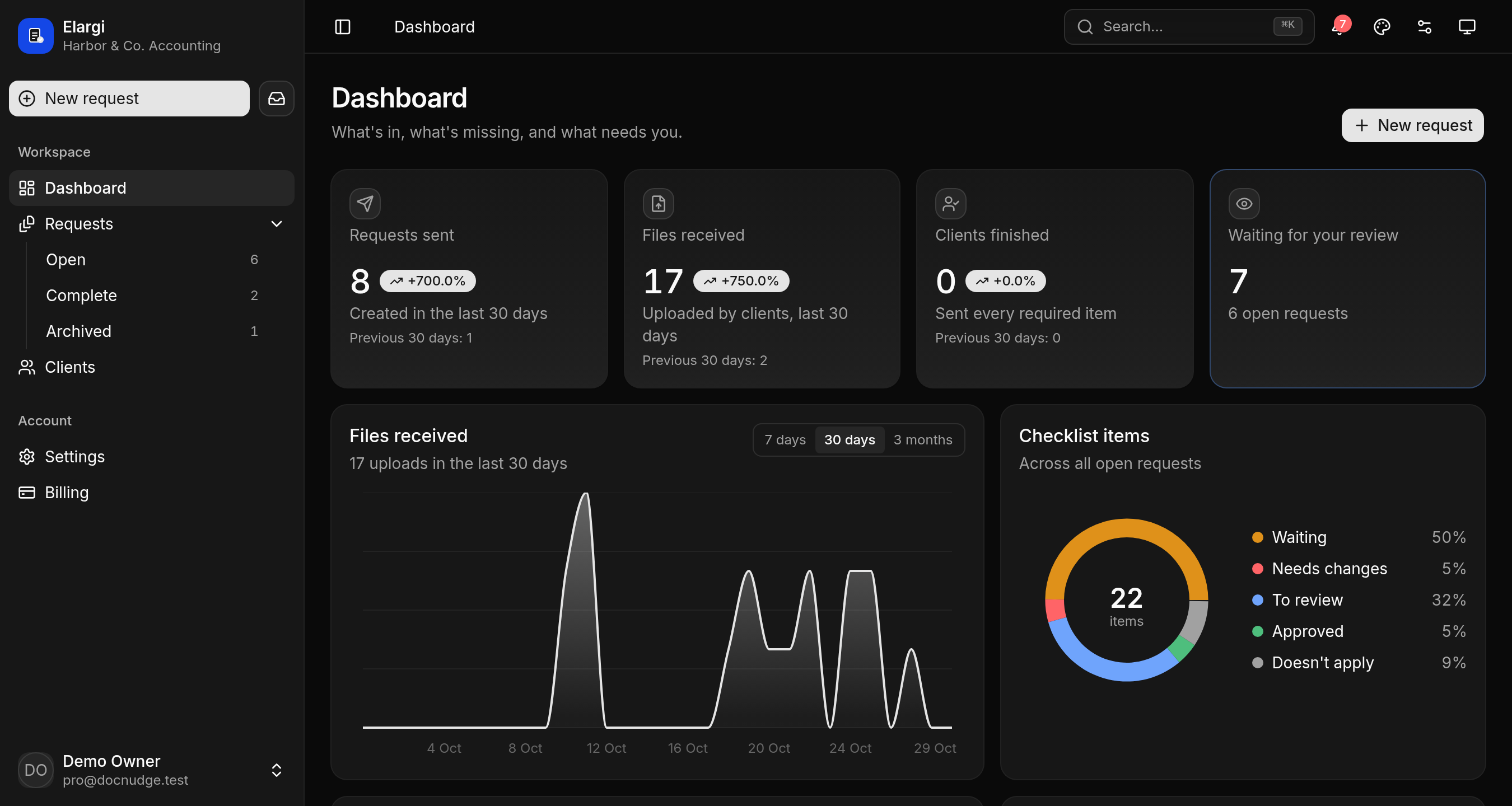
See exactly what your client sees
Tap an item, pick a file or take a photo. Nothing is uploaded. Better still, open elargi.com/demo on your phone.
No portal. No password.
Just a link that keeps asking.
Your clients won’t need an account. They tap the link, see the list and photograph the form on the kitchen table. Even the client who still faxes can manage it.
“I don’t have that one” counts as an answer. Clients can mark an item as not applying and say why. No more guessing whether they forgot the 1098 or just don’t have a mortgage.
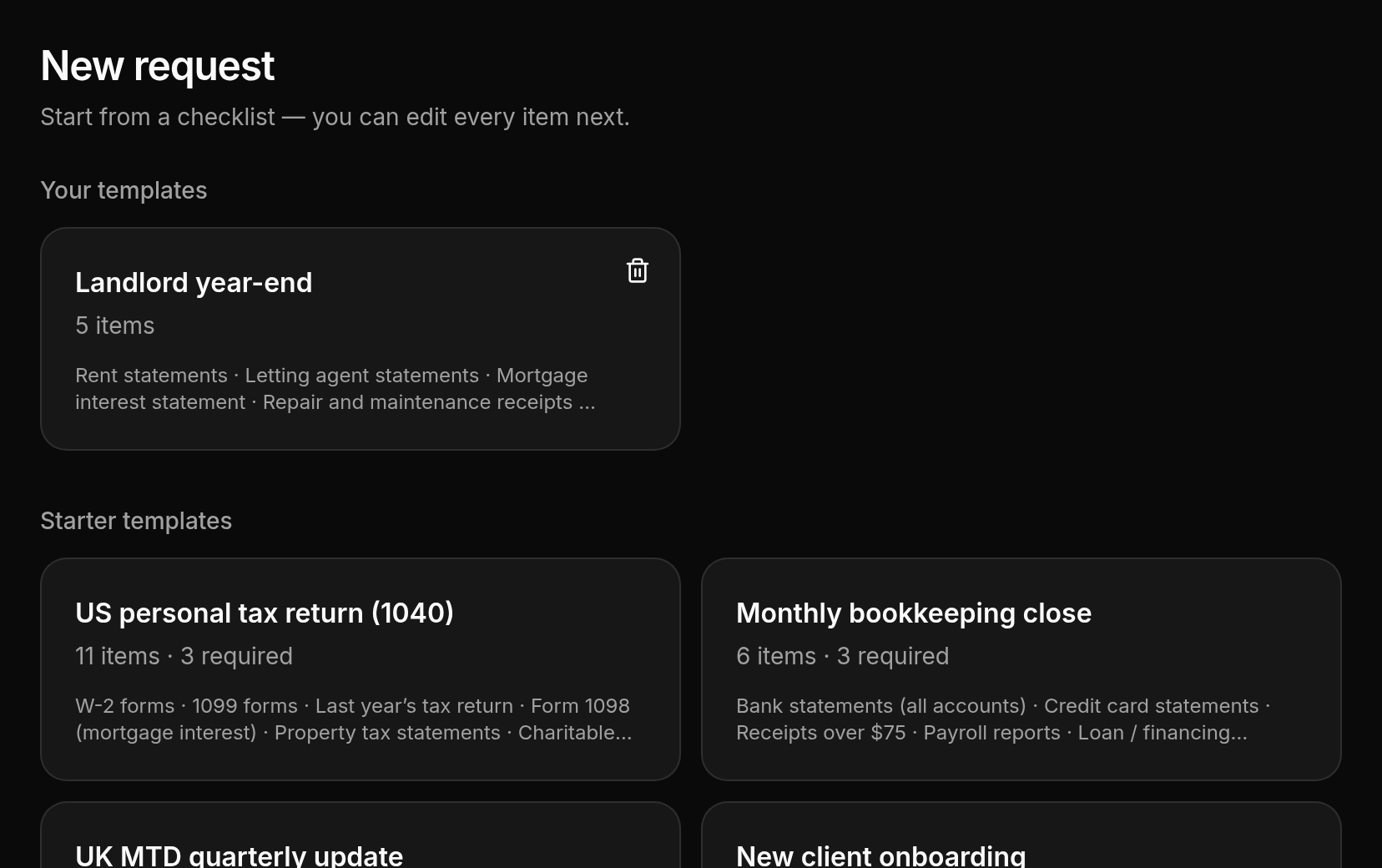
1Pick a list. Start from ours (1040, monthly close, MTD quarter, new client) or type your own in a minute.
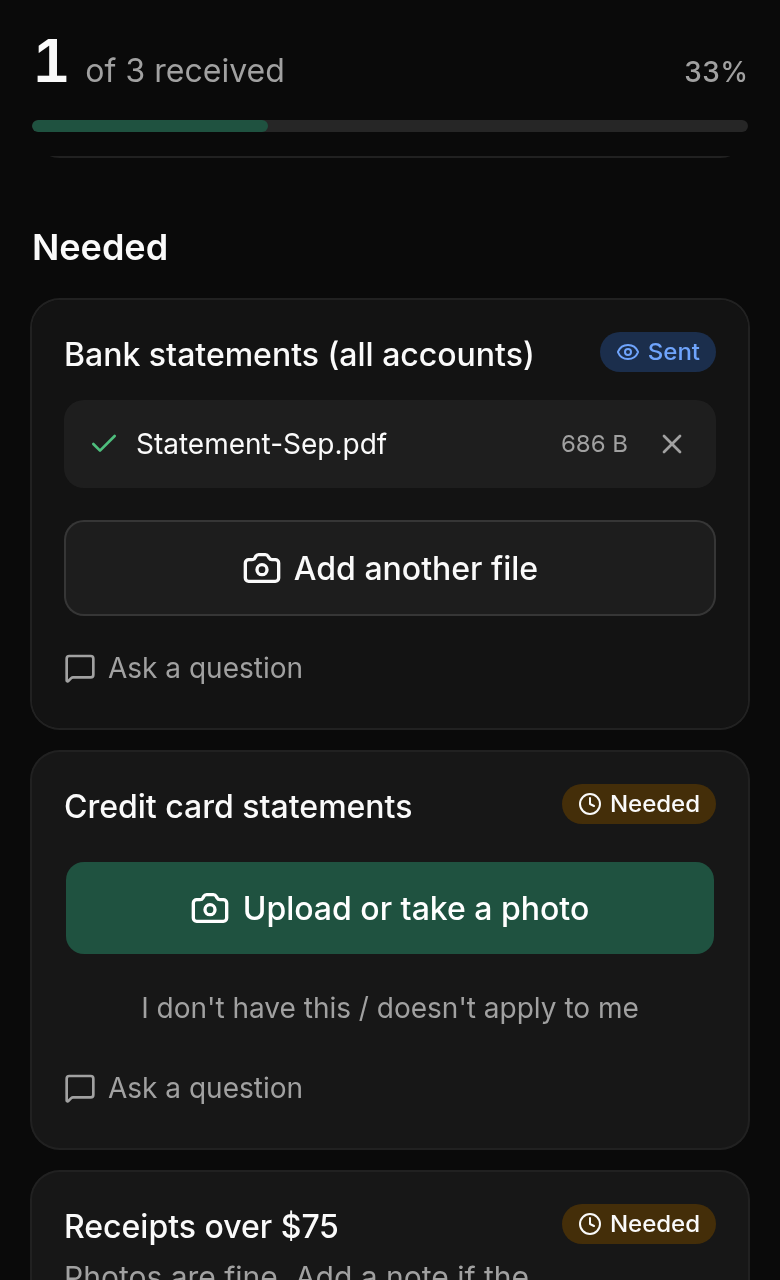
2Send it, then forget about it. Elargi emails the link, or you paste it into WhatsApp. Your client uploads from their phone, and reminders list only what’s missing until the last file lands.
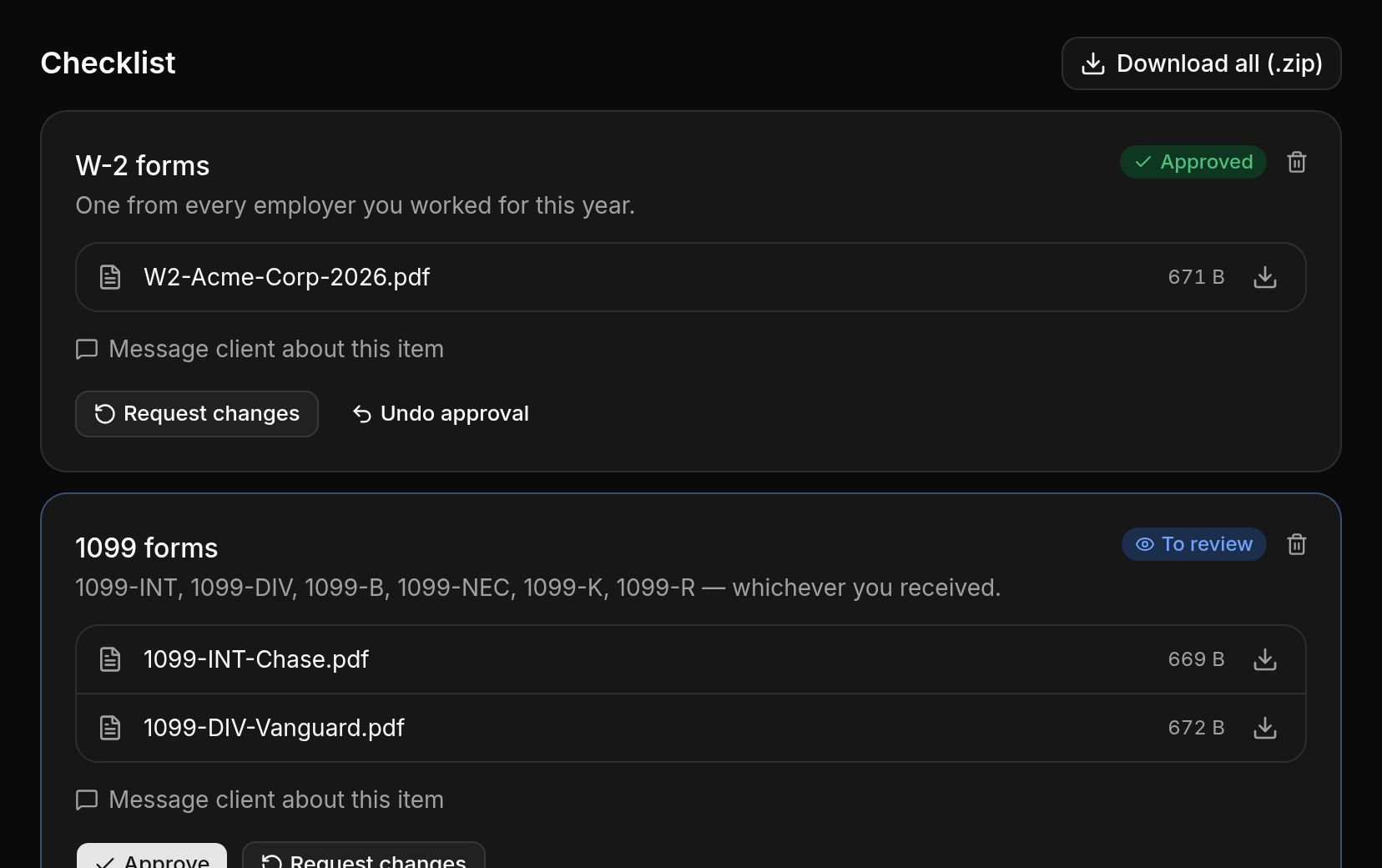
3Open the zip. Check each file, bounce the blurry ones back with a note, and download the lot in one go.
You didn’t qualify as an accountant
to write “just following up” emails.
Yet there you are in March, scrolling through five threads for one bank statement, unsure whether the client forgot it or never had it. Portals were supposed to fix that, right up until a client got locked out and phoned you instead. Elargi skips the portal: a link, a checklist, and follow-ups that go out without you.
Passwords your clients have to remember
From sign-up to your first request sent
Per request, private and impossible to guess
Built around the client
who ignores your emails.
Nobody downloads from the link. Clients can upload but never download. If they forward it to their brother-in-law, he gets nothing. Files are encrypted and never public.
Set up MTD once, not four times a year. Tick your MTD clients and send the quarterly checklist. From then on a fresh request goes out the day after each quarter ends.
Your practice software stays. Elargi does the nagging. When the client finishes, a webhook through Zapier or Make ticks the task off in Karbon, Financial Cents or TaxDome. A new row in Airtable can send a checklist, too. See the integrations
Bad files get caught early. Locked PDF, thumbnail-sized photo, the same file twice: the client is told on the spot, not by you a week later.
Signatures included. Clients can sign a PDF right on the page, from their phone. No extra tool to pay for.
Five photos, one PDF. Pages of a statement snapped on a phone are joined into a single file before they’re sent.
Next year is one click. Dates move on a year, and each item shows what the client sent last time.
In their language. The page and every email in English, Spanish, French, Arabic or Polish.
A Monday email. What came in last week, who’s gone quiet, and what’s due in the next seven days.
You know who opened it. When they opened the link, what they sent, and when they were last reminded.
“Doesn’t apply” is a button. With room for a note saying why.
Questions stay on the item. “Which bank account?” gets asked next to the document, and the answer is emailed back.
Both spouses on one request. Add a second contact. Same link, their own reminders.
One link per client. A private page with all their open requests, so nobody digs through old emails.
A sign-up link for new clients. Put it on your website. New clients enter their details and get your onboarding checklist.
Priced per firm, not per head
- 3 clients at a time (open requests)
- Reminders until everything is in
- E-signatures
- Catches locked PDFs, blurry photos and duplicates
- Saved checklists and every file as one zip
- 500 MB storage
- Unlimited clients (fair use)
- MTD quarters and yearly requests send themselves
- One checklist to all your clients at once
- Your logo and colours on client pages and emails
- 10 GB storage, 100 MB files
- Everything in Solo
- Up to 5 people, one bill
- Every upload copied to your Google Drive
- Connects to Zapier and Make (API and webhooks)
- 25 GB storage
- Free setup call with the founder
Things we won’t do
- Raise your price while you’re subscribed.
- Make you phone anyone to cancel. It’s a button on the billing page.
- Keep your data hostage. Export it whenever you like.
Prices in USD. Sales tax or VAT is calculated at checkout. Unlimited means fair use.
Happy with Karbon or Financial Cents?
Don’t switch.
Both keep automatic client reminders on a higher tier, so getting them means upgrading every seat. Elargi Firm adds the chasing for $39 a month, for up to 5 people.
- Karbon: automatic client reminders are on the Business plan, so every seat moves from $59 to $89/user/month.
- Financial Cents: automated client task follow-ups are on the Scale plan ($69/user/month, billed annually).
From published pricing (Financial Cents’ site; Karbon via Capterra), October 2026. Check each vendor for current plans.
Fair questions
Do my clients need to create an account?
No. Every request gets its own private link that can’t be guessed. The client opens it and uploads, from a phone or a computer.
How do reminders work?
You pick how often: every 2, 3, 5 or 7 days, or never. They go out on weekdays in office hours, and daily in the last three days before a due date. Each reminder lists only what’s still missing, can use your own wording, and goes out under your firm’s name, so if the client replies, the reply comes to you. Once they finish, the reminders stop.
Can I try it with real clients for free?
Yes. On the free plan you can have 3 requests open at once, reminders included, and it doesn’t expire. Upgrade if you need more.
Who can see uploaded files?
Only you and your team, once signed in. Clients can upload and see the names of what they’ve sent, but they can’t download anything, so a forwarded link won’t leak documents.
Can I cancel any time?
Yes. Billing is monthly through Paddle, our merchant of record. Cancel from the billing page and your plan stays on until the end of the month you’ve paid for. Your first payment has a 14-day money-back guarantee.
Will the price go up?
Not yours. What you pay when you sign up is what you keep paying while your subscription is active, even if new customers pay more later.
We already use Karbon / Financial Cents / TaxDome. Why add this?
You don’t have to switch. Elargi chases the client, and when they finish, a webhook (through Zapier or Make) marks the task done in the tool you already use. That way you don’t need to upgrade every seat just to get automatic reminders.
Something we didn’t cover? Email us